

Last updated:
Canva just stopped renting its image AI — and built its own. On 22 October 2026, Canva launched Canva Craft, the first image-generation model developed by its in-house Canva Research team. Craft does something most image models still fumble: it plans the layout before it renders — where every object goes, what size it should be, and exactly where the text sits. The aim is AI images that behave like designs: readable headlines, sensible hierarchy, and elements you can pull apart and edit afterwards. For anyone who makes posters, menus, social posts or thumbnails, this is a launch worth understanding.
Quick answer
Canva Craft is Canva’s first in-house AI image model, available to all Canva users in Dream Lab (how many generations you get depends on your Canva plan). It renders up to 2K in 30+ aspect ratios, returns up to 4 variations per prompt, handles in-image text in 55 languages (Canva’s figure), and — through Magic Layers — can turn a generated image back into editable text and objects. It was trained with a heavy emphasis on millions of human-made Canva templates rather than mainly photographs, which is why Canva says its layouts and text look designed instead of dreamed.
How Craft works: plan first, paint second
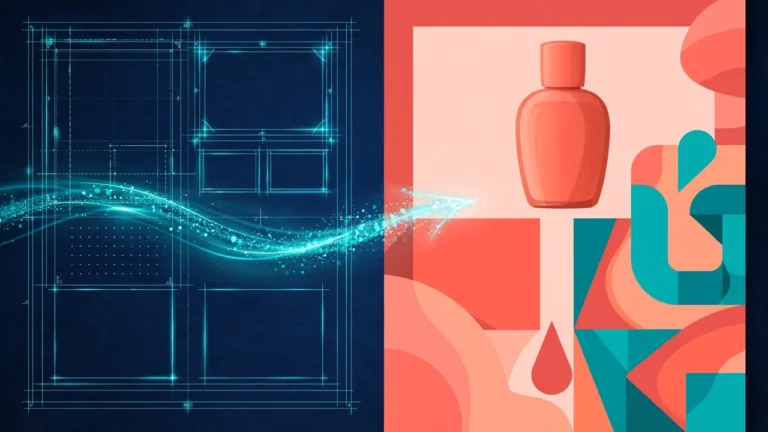
Most image models go straight from your prompt to pixels, which is why they produce beautiful photos with melted lettering and objects in odd places. Craft splits the job in two:
- The plan. The model reads your prompt and builds a composition plan — spatial relationships between elements, their relative scale, the visual hierarchy, and where text belongs.
- The render. A second stage paints that plan into an image of up to 2K resolution, in any of 30+ aspect ratios for different platforms.
Two design choices follow from that. First, targeted edits: because the model works from a plan, Canva says you can change one element — a headline, a colour, an object — without regenerating (and risking) the rest of the image. Second, Magic Layers: Canva’s image-to-design feature, which it launched in public beta in March 2026, can convert a Craft image into a layered Canva design with live, editable text and separate graphics. An AI image stops being a dead-end file and becomes a draft you can finish like any other design.
The training data is the other half of the story. Instead of learning mostly from photographs, Craft learned from Canva’s own library of human-designed templates — posters, social posts, presentations, infographics, menus and typography-heavy layouts. According to TechCrunch’s launch report, researchers from Leonardo.ai (which Canva acquired in 2024) contributed to the model. Canva also has a business motive: after years of relying on outside models for image generation, an in-house model gives it more control over quality, speed and cost — in August 2026 the company cut its 2026 revenue growth forecast by a third, citing higher-than-expected AI costs.
Canva Craft at a glance
| Canva Craft | |
|---|---|
| Launched | 22 October 2026, by Canva Research |
| Where | Dream Lab inside Canva (all users); Canva’s public API for developers; Canva MCP server integration listed as coming soon |
| Output | Up to 2K, 30+ aspect ratios, up to 4 variations per prompt |
| Text | Prompts in any language; rendered text in 55 languages (Canva’s figure) |
| Editing | One-change prompt edits; Magic Layers converts images to editable designs |
| Cost | Included with Canva; usage limits depend on your plan |
| Launch ranking | 4th on DesignArena’s image leaderboard at debut (Canva’s figure) |
| Coming next | Craft-fast and Craft-ultrafast — cheaper, faster variants (no dates or prices announced) |
Why the text matters more than the pictures
Ask any designer what AI images still get wrong and the answer is the same: words. Wrong letters, invented spellings, a price that changes between drafts. That is exactly the weakness our Leonardo AI vs Ideogram comparison is built around — Ideogram built its reputation on being the model that could finally spell.
Craft attacks the same problem from the design side. In one early hands-on review by an agency-focused writer (Gaurav Tiwari’s Canva Craft review), three agency-style briefs — posters and menus with headlines, dates, dish names and prices — came back with every requested word correct. Treat that as one reviewer’s promising result, not a guarantee; and note his warning, which matches the technology: the risk was not wrong text, it was extra text — copy the model added on its own that nobody approved. The professional rule survives the AI era intact: generate with Craft, proofread like a human. A wrong opening hour on a client’s menu is still your mistake, not the model’s.
Where Craft fits among the image generators
Craft is not trying to out-paint the photo models. Its home turf is finished graphics — the poster, the menu, the sale banner, the thumbnail with a three-word headline. If your workflow is “prompt → pick a variation → open in the editor → fix the text as real text → export,” few tools in our best AI image generators guide match that loop as directly, because most of them don’t live inside a design tool (Adobe Firefly inside Adobe Express is the closest equivalent). Ideogram remains the specialist to beat on pure text-in-image work; Midjourney-style models still win on photographic art direction. Craft’s bet is that most people don’t need art — they need a correct, editable design by lunchtime.
For creators specifically: thumbnails and community posts are obvious uses, and 30+ aspect ratios mean one design can leave as a Shorts cover, a post and a banner. Before you publish a Craft thumbnail, check how its headline reads at small sizes with our free YouTube title & thumbnail preview tool, and see our AI tools for YouTubers hub for the rest of the creator workflow.
How to try Canva Craft
- Open Canva and go to Dream Lab.
- Describe the finished design, not just the picture: subject, the exact headline text, the style, and where things should sit (“headline at top, product centre, price badge bottom-right”).
- Pick from the variations (up to 4), then send the winner into the editor and use Magic Layers to make its text and elements editable.
- Proofread every word — especially names, dates and prices — then export in the aspect ratio your platform needs.
FAQ
Is Canva Craft free?
Craft is available to all Canva users through Dream Lab, including free accounts. How many generations you get depends on your plan, so free accounts will reach their limits sooner than paid ones. Canva has not announced separate Craft pricing; developers can access it through Canva’s API.
How is Canva Craft different from other AI image generators?
Two things: it plans the layout (objects, scale, hierarchy, text placement) before rendering, and it was trained with an emphasis on human-made design templates instead of mainly photographs. The intended results are more readable text, more design-like compositions, targeted one-element edits, and output that Magic Layers can convert into an editable Canva design.
Can Canva Craft replace Ideogram or Midjourney?
For finished graphics with text — posters, menus, social posts, thumbnails — Craft is now a serious rival, especially if you already work in Canva. For photographic or highly artistic images, dedicated image models still lead. Many users will end up using both: Craft for designs, a photo model for art.
What does Canva Craft cost for businesses?
There is no separate Craft fee announced; it is part of Canva, with usage counted against your plan’s limits. Businesses should watch those limits on busy teams, and note that cheaper Craft-fast and Craft-ultrafast variants are planned. For the rest of a small-business AI toolkit, see our best AI tools for small businesses guide.
Can I edit a Canva Craft image after generating it?
Yes — two ways. You can prompt a single change (“make the headline blue”) without regenerating the whole image, and Magic Layers can convert the image into a layered design with live text and separate objects that you edit normally in Canva.
Sources and method: written 25 October 2026 and updated 31 October 2026 from Canva’s announcement, TechCrunch’s launch report, other launch coverage and one early hands-on agency review (gauravtiwari.org). Leaderboard positions and language counts are Canva’s launch claims. ToolsVentory articles are research-based: we have not tested Craft ourselves, we do not present third-party results as our own hands-on tests, and product details can change — confirm on Canva’s site before relying on them.