

Last updated:
Pick the Tool for the Stage, Not the Longest Feature List
Most researchers pick an academic AI tool by comparing feature lists and buying the longest one. That is why so many people pay for a tool they barely use. The better question is: which stage of your work is slow right now? Research has stages — finding papers, understanding them, writing the argument, and polishing the draft — and different tools serve different stages.
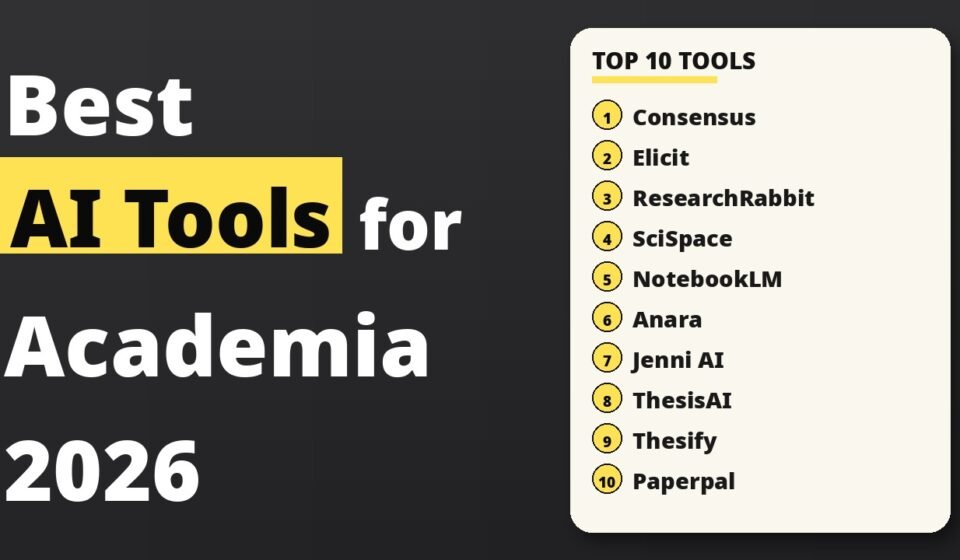
This guide follows the line-up and workflow thinking of Academia Insider’s video “The Best AI Tools for Academia in 2026” (watch it here: The Best AI Tools for Academia in 2026 – Stop Searching, Start Using!). The explanations below are written fresh for this article, and like our other guides it is research-based: we compared each tool’s documented features and published plan details rather than testing every tool hands-on. The video’s core principle runs through the whole guide: use AI to sharpen your thinking, not to replace it.
Prices below are approximate figures gathered in October 2026, and several are annual-billing rates. Plans change often, so confirm the current monthly and annual price on the vendor’s pricing page before you pay.
Stage 1: Find the Right Papers
1. Consensus: ask what the evidence says
Consensus is an AI search engine for one question: what does the published research actually say? Ask in plain language and it searches peer-reviewed papers, then writes a cited answer from what it found. Its standout feature is the Consensus Meter, which sorts the top papers on a yes-or-no question into yes, no, possibly, or mixed, so you can see whether a claim is settled or contested. Its limit: coverage is not comprehensive, and it can still misread a real paper, so check important claims against the original text. Free tier: unlimited searches with limited AI use. Pro is reported at around $20 per month, or $144 per year.
2. Elicit: turn a question into a structured review
Where Consensus gives you a verdict, Elicit does the legwork behind a literature review. Ask a research question and it finds relevant papers, then pulls the same details out of each one into a table: population, methods, outcomes, and columns you define. That table turns weeks of reading into days of verification. Its limit: automated extraction can misread tables and nuance, so check every extracted cell against the source before citing it. Free Basic tier: unlimited search with limited research-agent use. Paid tiers start at around $10 to $12 per month billed annually; its pricing page has shown more than one plan ladder, so confirm live details first.
3. ResearchRabbit: follow the citation trails
ResearchRabbit works differently from a search engine. Start with a few seed papers that matter to your topic, and it maps what is connected to them: similar work, the papers your seeds cite, and the newer papers that cite your seeds. The visual network is excellent for spotting clusters, key authors, and foundational studies that keyword searching misses, and it syncs with Zotero. Its limit: citation chasing is a starting point, not a replicable search strategy, so it cannot replace a proper database search for a systematic review. It has a free tier, which makes it an easy first step; check its pricing page for what the free tier currently includes before you build a project around it.
Stage 2: Understand and Synthesise What You Found
4. SciSpace: chat with a paper until it makes sense
SciSpace, formerly Typeset, is an AI copilot for reading scientific papers. Upload a PDF or paste a DOI, then ask questions in plain language, highlight a passage for an explanation, or get help with a figure, table, or equation. Its standout feature is that chat: instead of re-reading a methods section four times, you ask what it means and verify the answer against the text. Its limit: explanations can oversimplify, and it reads papers better than it finds them, so pair it with a search tool. Free tier: limited daily paper chats. Premium is reported at around $12 per month billed annually.
5. Gemini Notebook (formerly NotebookLM): build a private research brain
Gemini Notebook, called NotebookLM until Google renamed it in July 2026, is Google’s source-grounded research assistant. Upload your own documents — papers, notes, reports, links — and it answers questions from those sources, with citations pointing back to the exact passages. That grounding is the whole point: unlike a general chatbot, it is built to answer from your material rather than the open internet, though it can still misread a source. It also turns a source library into summaries, briefing documents, timelines, and podcast-style audio overviews. Its limit: it only knows what you give it, so a thin source library gives thin answers. Free with a Google account, with usage limits; higher limits come with a paid Google AI plan.
6. Anara: ask questions across your whole library
Anara, formerly Unriddle, is a research workspace where you build a library of papers and files, then ask questions across all of them at once and get answers pointing to the exact passage they came from. That passage-level citation is its real strength: you can check a claim in one click instead of trusting a summary. Its limit is the same as every document-chat tool: a citation shows where a claim came from, not that the model’s reading of it is correct. Free tier: daily allowance and uploads up to 20 MB or 120 pages per file. Paid plans are reported to start at around $10 per month, with Pro at around $20 per month for larger uploads, OCR, and more models.
Stage 3: Write the Argument
7. Jenni AI: draft with citations beside you
Jenni AI is a document editor with AI autocomplete built for academic writing. As you write, it suggests continuations in your own style, and you can pull citations from your uploaded PDFs and library straight into the text, with bibliographies in thousands of styles. Its review feature also flags unsupported claims, contradictions, and retracted sources. Its limit is well documented: generated citations and facts can still be wrong, so every citation needs manual checking before submission. Free tier: daily limits on autocompletes, chat, and edits. Plus is reported at around $12 per month and Pro at around $29 per month on annual billing; paying month to month costs more, so compare both on the pricing page.
8. ThesisAI: a fast first draft for long documents
ThesisAI is built for one job: turning a prompt and your sources into a long first draft, up to dozens of pages, with native LaTeX output and Overleaf integration for science and maths writing. Its standout feature is long-form generation from a single prompt, fed by your Zotero library. Its limit matters: its suggested citations are not grounded in retrieved literature the way a search tool’s are, so every citation needs verification, and the draft will need serious editing for voice and methodology. It has no built-in plagiarism checker. Free basic tier; paid plans reported from around $14 per month billed annually, Pro around $18 per month.
9. Thesify: feedback on the draft you already wrote
Thesify takes the opposite approach: it does not write your paper for you. Upload your own draft and get real-time, rubric-based feedback on structure, argument, and clarity, plus citation help, paper summaries, and a journal and conference finder for submission time. Its standout feature is that feedback loop, which keeps your voice and ideas intact while improving the work. Its limit: feedback is only as good as the draft you feed it. It offers a 7-day trial; the individual plan is reported at around €6.25 per month billed annually, and institutional pricing is custom.
Stage 4: Check and Polish Before Submission
10. Paperpal: the pre-submission safety net
Paperpal is an AI writing assistant built for academic publishing. It gives language suggestions tuned to academic register, leaves references, equations, and technical terms alone, and runs a submission-readiness report with dozens of checks against journal requirements, plus plagiarism scanning and AI-content detection. Its standout feature is that pre-submission report, which targets the reasons journals desk-reject papers. It works inside Word, Google Docs, Chrome, and Overleaf. Its limit: it polishes and checks; it does not do your literature review or your argument for you. Free tier: limited monthly suggestions and daily AI uses. Prime is reported at around $12 per month billed annually, with a higher Pro tier for heavy manuscript work.
The Integrity Rules That Keep Your Work Yours
- AI hallucinates citations. Models can invent references that look real. Never cite a reference you have not opened and confirmed yourself.
- Verify every AI claim against the source. A cited answer is a lead, not evidence. Read the passage and make sure it supports your sentence.
- Do not submit AI-written text as your own work. Most universities and many journals now have explicit AI policies. Brainstorming, outlining, polishing, and checking are normally fine; handing in generated prose as your own writing usually is not. Read your institution’s policy before you submit.
- Keep a human in the loop. You decide which papers matter, what the argument is, and what the conclusion means. If a tool’s output surprises you, investigate it instead of copying it in.
- Watch for retracted and low-quality sources. Some tools flag retracted papers; others do not. A citation to a retracted study damages your credibility far more than a missing citation does.
- Disclose AI use where required. Some journals and courses ask you to state which tools you used and how. Keep a short note of that as you work.
For interview or recording work, the same discipline applies to transcripts: clean them with a tool like the free Transcript Cleaner, but check important quotes against the recording before publishing them. And when you brainstorm with a general AI assistant or ask it to explain a concept, the AI Prompt Generator turns a rough idea into a structured prompt with the audience, structure and length spelled out, which beats a vague one-line question.
Which Tool for Which Job
| Tool | Stage | Best for | Free tier |
|---|---|---|---|
| Consensus | Find | What the evidence says | Yes, limited AI use |
| Elicit | Find | Structured literature reviews | Yes, limited agent use |
| ResearchRabbit | Find | Mapping a field from seed papers | Yes, free tier |
| SciSpace | Understand | Chatting with a hard paper | Yes, limited daily chats |
| Gemini Notebook (formerly NotebookLM) | Understand | Answers from your own library | Yes, Google account |
| Anara | Understand | Cited answers across documents | Yes, daily allowance |
| Jenni AI | Write | Drafting with citations beside you | Yes, daily limits |
| ThesisAI | Write | Fast first drafts, especially LaTeX | Basic free tier |
| Thesify | Write and polish | Feedback on your own draft | 7-day trial |
| Paperpal | Check and polish | Pre-submission and plagiarism checks | Yes, limited use |
Why Perplexity and ChatGPT are not on this list: they are general-purpose assistants built around the open web rather than a database of scholarly papers, so they suit quick scoping better than a literature review. If you use them that way, our Perplexity vs ChatGPT for research comparison covers how each one handles citations.
A Sensible Starter Stack
Starting from zero, you do not need all ten tools. A free starter stack covers the whole workflow: ResearchRabbit to map the field, Consensus to check what the evidence says, Gemini Notebook to work through your own source library, and Paperpal’s free tier to polish the draft. On the free tiers that costs nothing and already beats working with a general chatbot alone, because every step stays tied to real sources. When one stage becomes a bottleneck, pay for the tool that serves that stage: a heavy literature review justifies Elicit, a hard reading list justifies SciSpace or Anara, a long thesis justifies ThesisAI or Jenni AI.
For a broader look at how AI tools map to tasks in a different field, see Best AI Tools for YouTubers in 2026, which applies the same by-task thinking to creators. The principle is identical: pick the tool for the job, not the tool with the most features.
Frequently Asked Questions
Which AI tool is best for academic research?
There is no single best tool, because research has stages. Consensus and Elicit are strongest for finding and synthesising literature, Gemini Notebook and Anara for understanding your own sources, Jenni AI and ThesisAI for drafting, and Paperpal for pre-submission checks. Start from the stage that is slowest for you.
Are these AI tools free for students?
Most have a usable free tier: Gemini Notebook is free with a Google account, and ResearchRabbit, Consensus, Elicit, SciSpace, Jenni AI, Anara, and Paperpal all offer free plans with limits. Thesify offers a trial rather than a permanent free tier.
Can AI write my thesis or paper for me?
Tools like ThesisAI can produce a long first draft, but it still needs your argument, your verified citations, and heavy editing. Submitting AI-generated text as your own work risks academic misconduct under most university and journal policies.
How do I know if an AI citation is real?
Open the source and check it. Search the title, confirm the authors and journal, and read the passage the claim supposedly comes from. A citation you have not verified is worse than no citation at all.
Do I need to disclose that I used AI tools?
It depends on your institution and your target journal. Many now ask for a disclosure statement describing which tools were used and how. Check the policy before you submit, and keep a short note of your tool use as you work.
Frequently Asked Questions
What is the best AI tool for academic research?
It depends on the stage you are stuck at. Consensus and Elicit are strongest for finding and synthesising papers, SciSpace and NotebookLM for understanding them, and Jenni AI for drafting with citations beside you. Pick the tool for your bottleneck, not the longest feature list.
Can AI tools do a literature review for me?
They can speed one up a lot — Elicit turns a question into a structured review and ResearchRabbit follows citation trails — but you still need to read the key papers yourself and check every claim before it goes in your work.
Are AI academic research tools free?
Most of the tools in this guide have free tiers that cover everyday use, with paid plans for heavier libraries, more chats, or team features. Start free and pay only when you hit a limit that actually slows you down.
Can I cite AI-generated summaries in my paper?
Cite the paper, not the summary. Use the AI tool to find and understand sources, then read the original and cite that. Most universities and journals expect the cited source to be the paper itself.
Which AI tool is best for finding papers on a topic?
Consensus answers with evidence from papers, Elicit builds a structured summary of the literature, and ResearchRabbit maps the citation network around papers you already like. Use Consensus or Elicit to start, ResearchRabbit to go deeper.